
Enabling extra repos for RHEL on OBS
It took me a bit of time and effort to figure this out, so thought I’d post it for other people’s benefit (and for future-forgetful-me!).
If you use Open Build Service (OBS) to build Linux RPM packages on RHEL-compatible distros like Alma Linux or Rocky Linux and your builds fail due to dependencies not being found, read on. This might help.
Starting RHEL 8, RedHat (and clones) shifted to a multi-repo layout for packages named BaseOS, CodeReady Builder (CRB), AppStream etc. Packages are now divided between these repos.
By default OBS only enables the baseos repo for these distros. To enable other repos (including the Fedora EPEL) on your OBS project, you need to add them to your OBS project’s Meta -
  <project name="home:pstavirs">
  . . .
  <repository name="AlmaLinux_9">
    <path project="AlmaLinux:9" repository="baseos"/>
    <path project="AlmaLinux:9" repository="appstream"/>
    <path project="AlmaLinux:9" repository="CRB"/>
    <path project="Fedora:EPEL:9" repository="standard"/>
    <arch>x86_64</arch>
  </repository>
If you are using a local OBS instance with interconnect enabled to the public OBS instance, just prefix the local project name of the interconnect OBS instance -
  <repository name="AlmaLinux_10">
    <path project="openSUSE.org:AlmaLinux:10" repository="baseos"/>
    <path project="openSUSE.org:AlmaLinux:10" repository="appstream"/>
    <path project="openSUSE.org:AlmaLinux:10" repository="CRB"/>
    <arch>x86_64</arch>
  </repository>
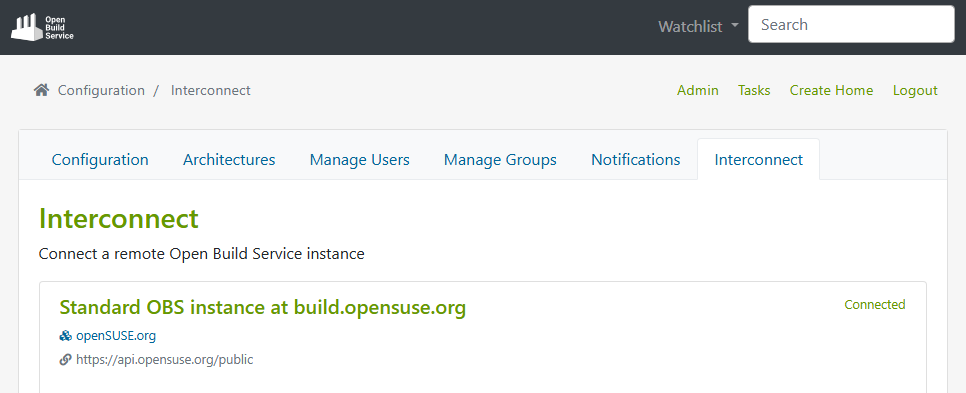
Here’s how my Interconnect is set up on my local OBS instance (note the project name openSUSE.org) -
Hope this helps you!
Leave a Comment